CoreMatter: Built From Over 25 Years Of Experience
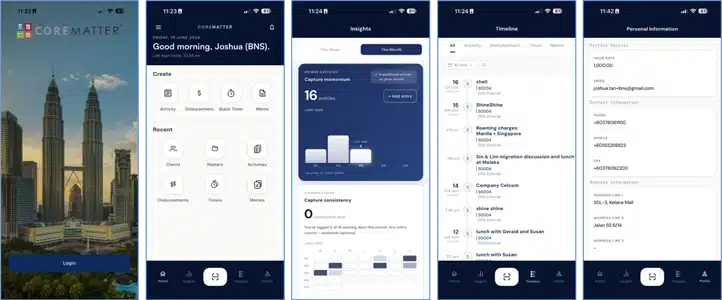
A modern reimagining of CoreMatter mobile app, rebuilt around efficiency and a cleaner, more intuitive experience — designed to make capturing legal work effortless.
Where v1 was built around recording and billing work, v2 is built around the habit of capturing it. Benchmarks that measured volume are gone; in their place, Insights and a steady-habit philosophy. The Timeline, date filtering, and a single streamlined capture flow are new. And the whole interface has been tightened into a calmer, more considered, premium experience.
Design philosophy
Premium yet simple — refined and professional, with nothing on screen that doesn’t earn its place.
Controlled and considered — a calm, consistent visual language across every screen, so the app always feels familiar and easy to navigate.
Built for Legal Professionals — authoritative and trustworthy, suited to everyone from junior associates to senior partners.
Efficiency first — every flow streamlined to reduce taps, friction, and thinking.
What's New in v2
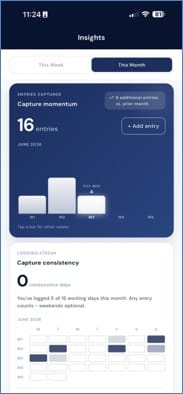
Insights — a dedicated space showing your capture momentum and consistency at a glance, so you can see how well you’re keeping up.
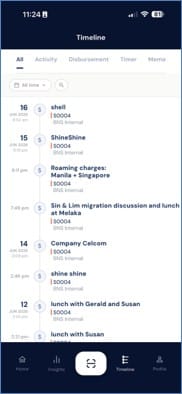
Timeline — a single chronological overview of every entry, giving instant at-a-glance visibility of your logged work.
Smart date filtering, everywhere — consistent, intuitive date controls throughout the app. Filter the Timeline by ready-made ranges (today, this week, last 30/90 days, this year, or custom) and switch Insights between timeframes like this week or this month. Wherever you are, you can frame your work by exactly the period you care about.
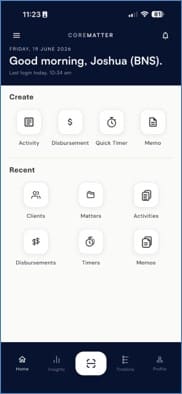
Streamlined Create flow — logging any kind of work (Activity, Disbursement, Quick Timer, Memo) now runs through one neat, consistent flow. Fewer steps, less clutter, faster capture.
Workspace Preview — see the relevant workspace details at a glance while creating any entry, so you always have the right context in front of you as you log.
Help Centre — in-app guidance and support, so users can find answers and get the most out of CoreMatter without leaving the app.
Notifications — official messages from the CoreMatter team direct to users: maintenance notices, announcements, service alerts, and other updates, so users always stay informed.
Two-Factor Authentication (2FA) — optional added security that requires a second verification step at sign-in, giving users stronger protection over their accounts.
Refreshed home screen — cleaner and more focused, for faster access to everything.
One-tap capture — a central capture button in the navigation bar to log work from anywhere in the app.
The Thinking Behind The Features
Insights is about building a consistent habit. It helps lawyers maintain a steady, reliable logging routine and a complete record of their work — supporting consistency and momentum so nothing gets left behind. Any entry counts; the focus is simply on keeping up.
Timeline is about clarity. Instead of digging through records, users get an immediate, organised overview of everything they’ve captured — easy to find, easy to review.
Date filtering is about control and consistency. The same familiar date controls appear across the app, so users always view their work through the lens they choose — and never have to relearn filtering from one screen to the next.
The Create flow is about removing friction. Capturing work should never feel like a chore; a quick, consistent flow — with the right workspace context surfaced as you log — supports the very capture habit Insights encourages.
Notifications keep users informed. A clear, reliable channel for official updates straight from the CoreMatter team — maintenance, announcements, and service alerts — so users always know what’s happening and exactly where the message is coming from.
Security reflects the sensitivity of legal work. Legal Professionals handle confidential, privileged client information, so protecting access matters. 2FA adds a critical extra layer against unauthorised access — supporting confidentiality obligations, safeguarding client trust, and giving firms peace of mind that their data is secure.
Overall, v2 is a modern take onCoreMatter mobile app — geared toward efficiency and a better experience end-to-end, while staying premium and simple.
Download CoreMatter Mobile
The comprehensive cloud-based legal practice management solution designed to enhance your firm's productivity and efficiency
Any question related to CoreMatter?
The CoreMatter team wants to hear from you!
Equiry
email-us@bnsasia.biz
Customer Support
corematter
@bnsasia.zohodesk.com
Telephone
+60378061100
Hi, how can we assist you?
Any questions related to CoreMatter? We’re here to address it.